
App Redemption
How To Redeem A Voucher?
After becoming a member of your favorite brand and receiving the membership card, you can also redeem your point in exchange for vouchers. The point you earn is exchangeable for a product, for example, the point in our TAD restaurant can be redeemed into a coffee! It is as easy as the following step:
- Choose your favorite membership card that you want to redeem
- Choose the menu “Redeem” to check the brand redemption voucher
- Choose the voucher that you want in exchange for your points, then click “Redeem”
- Make sure the quantity is correct and press “Redeem”
- Check the details before checking out and press “Continue To Payment”
- Press the points that you want to exchange
- Confirm your payment using points and press “Yes”
- Enter your PIN for security measure
- Then press “Finish”!
- Your redemption process is complete and you can see the e-Voucher in the “My Voucher” menu and they are ready to be used!

How to Redeem My Rewards into Various F&B e-Vouchers?
Now members are able to redeem their points and rewards to lots of F&B e-Voucher. We’ve added KFC, Tous Les Jours, Ta Wan and many more. This new redemption option will be automatically available in your program. If not, ask our client representative team to enable this redemption option in your program.
Here are the easy way to redeem it:
- Open your membership card and then go to “Redeem” menu
- Open the “F&B e-Vouchers” category
- Choose the e-Vouchers that you’d like
- Complete the transaction and choose your point as the payment method
- Voila, you can find the e-Vouchers in the “My Voucher’ button!

How to Redeem Mobile Postpaid Payment?
Now Members are able to redeem points and rewards to pay for postpaid mobile phone billing in a few clicks. New redemption option is available and can be added to your program, ask our client representative team now. Here are the easy way to redeem it:
- Open your membership card and then go to “Redeem” menu
- Open the “Pulsa Pascabayar” segment
- Choose your own provider, in this case we use telkomsel as our example. Press the “Redeem” button
- Input your phone number and press “Check Bill” to check your outstanding bill
- If you have outstanding bill it will appear including the detail informations about your bill, then press “Continue To Payment” to proceed the redemption
- Choose the payment method, you can use your point / balance or mix it with other payment as well
- Congrats! you’ve successfully completed the redemption process.
- You can check the redemption status by clicking “See Transaction Detail” or you can check it in History menu.

How to Redeem PLN Billing?
Now members are able to redeem their points and rewards to pay for PLN billing in a few clicks. This new redemption option will be automatically available in your program. If not, ask our client representative team to enable this redemption option in your program.
Here are the easy ways to redeem it Postpaid Billing:
- Open your membership card and then go to the “Redeem” menu
- Open the “PLN” category
- Choose “Tagihan Listrik”
- Input your Meter Number / Customer ID and click “Check Bill” to check your billing
- If you have an outstanding bill, it will appear including the detailed information about your bill, then click “Continue To Payment” to proceed with the redemption
- Choose the payment method, you can use your point/balance or mix it with other payments as well
- Congrats! you’ve successfully completed the redemption process.
- You can check the redemption status by clicking “See Transaction Detail” or you can check it in the History menu.
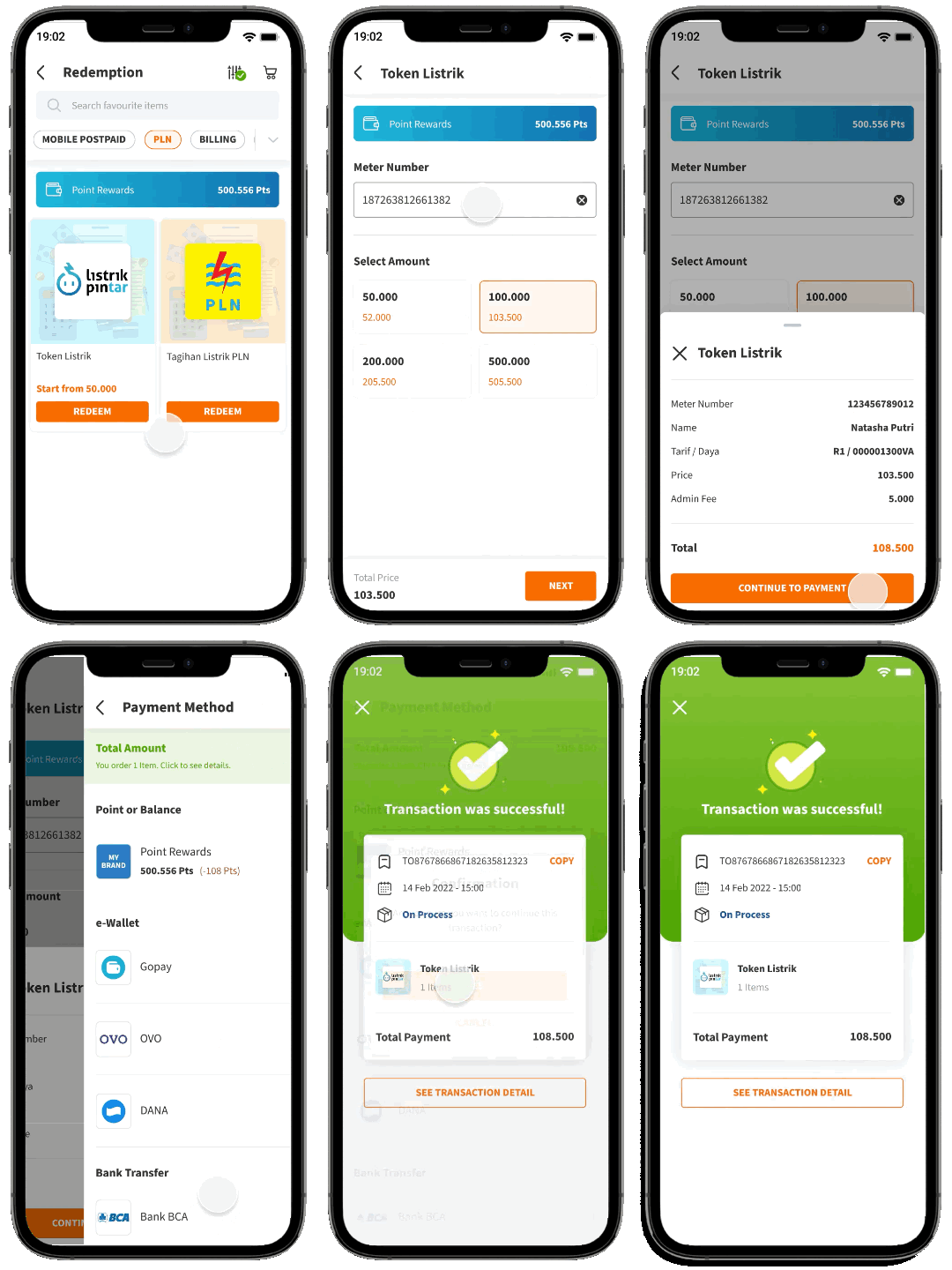
 Here are the easy ways to redeem it Postpaid Billing:
- Open your membership card and then go to the “Redeem” menu
- Open the “PLN” category
- Select Token Listrik
- Input Meter Number
- Now we have added a confirmation page after the meter number is inputted so you can check on the registered name, and fees/power displayed before completing the purchase. Kindly confirm it so we are good to go
How to Redeem My Points to Pay PDAM Billing?
Now members are able to redeem their points and rewards to pay for PDAM billing in a few clicks. This new redemption option will be automatically available in your program. If not, ask our client representative team to enable this redemption option in your program.
Here’s how to redeem the points:
- Click the “Redeem” button
- Choose “Billing” category
- Choose “Air PDAM”
- Fill in your customer number and click “Check Bill”
- Click “Continue to Payment” if the bill is already correct
- Choose the point to use to pay
- Confirm the payment
- Voila! Your water bill is paid!
