Target Achievement Insight
The Target Achievement Insight menu is used to display various data and reports required by the brand regarding member target achievement programs.
How to Read Target Achievement Insight Data
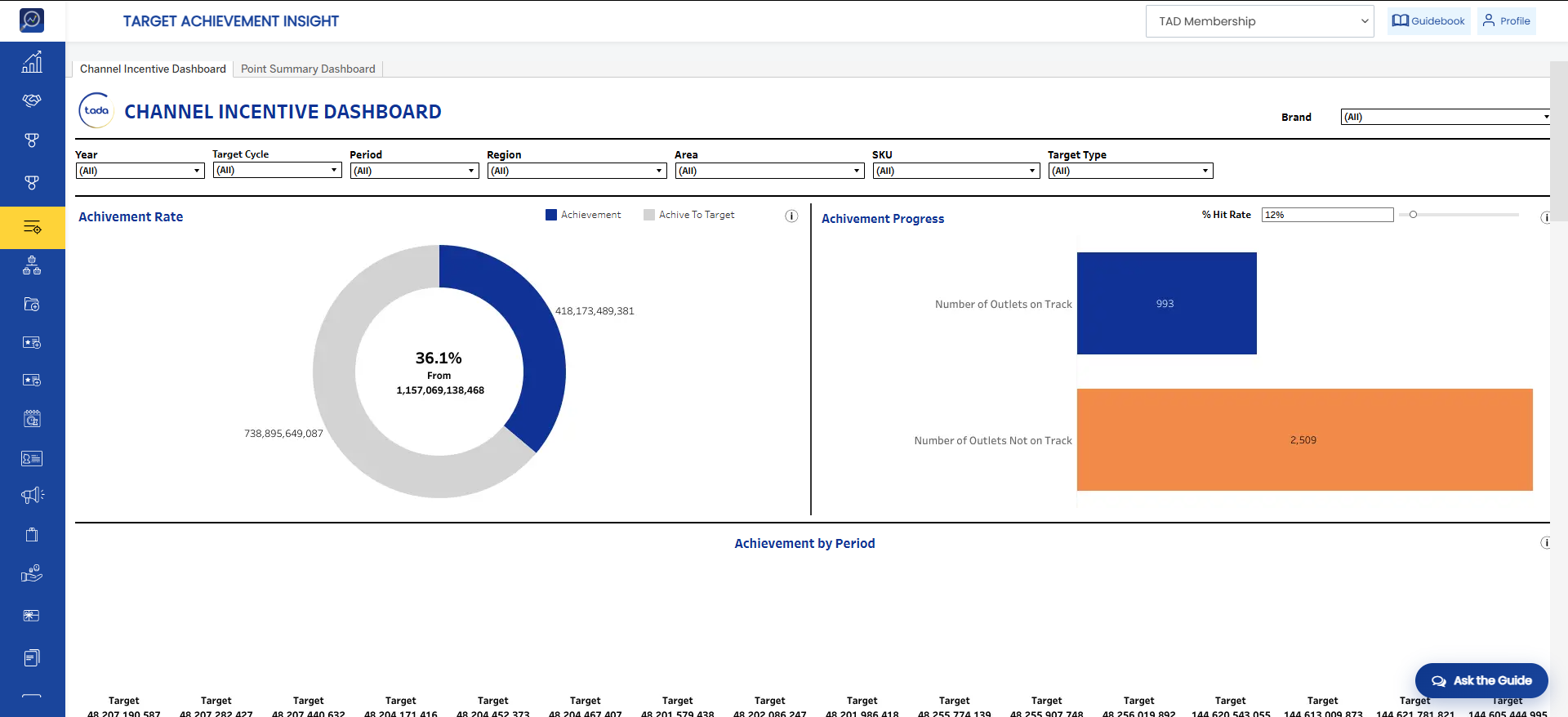
- Achievement Rate: Displays the overall user achievement rate based on the selected date filter.
- Achievement Progress: Displays the number of users based on achievement progress and the selected target.
- Achievement by Period: Displays the number of targets and achievements based on the selected period and target.
- User
a. Achievement by User: Displays the number of targets and achievements for each user. Results are calculated based on the selected date filter.
b. Achievement by User per Period: Displays the number of targets and achievements for each user based on the selected period.
- Target
a. Achievement by Target: Displays the number of targets and achievements for each target. Results are calculated based on the selected date filter.
b. Achievement by Target per Period: Displays the number of targets and achievements for each target based on the selected period.
- Region
a. Achievement by Region: Displays the number of targets and achievements for each region. Results are calculated based on the selected date filter.
b. Achievement by Region per Period: Displays the number of targets and achievements for each region based on the selected period.